Rostering via Resonant Education Flat Roster File
The Resonant Education Flat Roster File exchange is a roster file format created by Resonant Education that provides a convenient method for rostering your student, teacher and parent users.
The Flat Roster File is set up with 1 row per user regardless of if the user is a student, teacher or parent. There are fields that are required which are indicated in the “Is Required” column. The demographic or student program fields are generally only completed for the student users you are creating as this allows for filters and comparison by student sub-group in reporting.
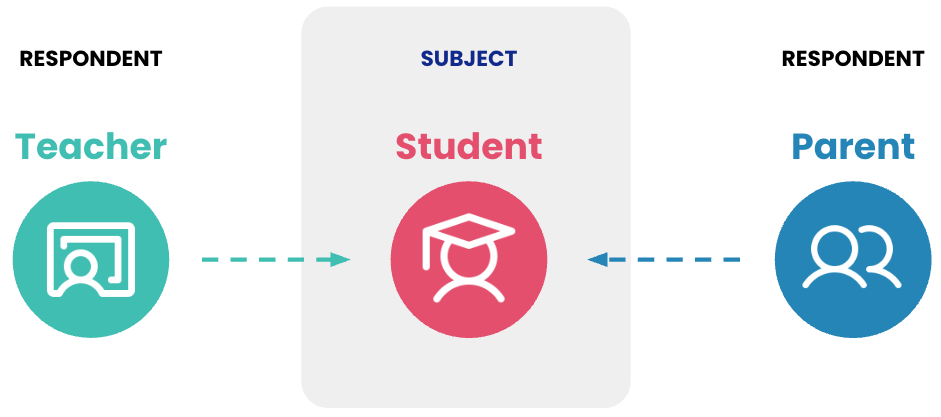
Assigning a teacher or a parent to complete the survey about a student is done by linking the Teacher ID or Parent ID on the student row. The student is the subject, and the Teacher and Parent users are respondents about the subject. Note: if you are not able to specify the Teacher ID and/or the Parent ID, you can leave these fields blank and add that information at a later time.
Important Notes About Creating A Successful Flat Roster File
It is essential to match the column order in the Flat Roster File specification. The importer looks for the data in particular columns and does not look at the name in the column header row.
Do not add extra columns to the Flat Roster FIle as this will cause an import error.
All required fields must be filled in for each student, teacher or parent row.
The User ID must be unique across all students, teachers and parents.
An email can only be assigned to one User ID across all students, teachers and parents.
Emails need to be properly formatted.
Ensure that all school names are used and spelled correctly throughout the file.
For Fields that are validated, you must use values from the Valid Values list. Values that are not on the Valid Values list will cause an import error.
All date formats are in YYYY-MM-DD format.
Only fill in the Teacher User ID Match and the Parent User ID Match on the student row. If not known at the time of the initial import, these can be added later.
If the User ID of an imported user changes (eg: moving to a new SIS), you will need to work with your Resonant Education Project Manager to update the old User ID to the new User ID.
If you cannot put students, teachers and/or parents in the same file, that is fine as long as the student file is imported last as it contains links to Teacher IDs and Parent IDs that need to exist in the system.
For your subsequent school years, ensure that the User IDs remain consistent. If they change because of a new SIS or renumbering, please work with your project manager to create a crosswalk of User IDs for updating.
If you have formulas in your source file, please convert them to values before exporting as a CSV file.
The Flat Roster File Specification
Col | Column
Name | Description | Is
Required | Field
Validated | Valid Values
(only use these values) |
|---|
A | User ID | The User ID in the source system for user data. For school environments, this is the ID used in your student information system - Student ID, Teacher ID, Parent/Guardian ID. | Yes | Yes | The User ID must be unique across all students, teachers and parents. |
B | Active | Indicates if this user is active. | Yes | Yes | Valid values are 1 or 0 |
C | First Name | First / given name of this user. | Yes | No |
|
D | Last Name | Last / family name of this user. | Yes | No |
|
E | Organization Name | The name of the organization that this user belongs to. The name must match the name that was used to set up the organization in the Resonant Education Admin portal. | Yes | Yes | This must be an organization name that exists in the Admin Portal |
F | Email | Unique email address of this user. Required for doing survey sharing via email or for users that need to log into the Admin Portal or the Reporting Portal. | Conditionally required | Yes | The Email must be unique across all students, teachers and parents. |
G | Cell Phone Number | Cell phone number for this user. Conditionally required for doing survey administration via SMS text message. | Conditionally required | Yes | 10 digits with no separators (- or .) |
H | Opt-out | Indicator if this user has opted out of the survey. | Optional | Yes | Valid values are 1 or 0 |
I | User Characteristic Start Date | Inclusive start date for any user characteristics. This is typically set as the start of the school year and can be updated as needed. | Conditionally required | Yes | Start Date in YYYY-MM-DD format |
J | User Characteristic End Date | Inclusive start date for any user characteristics. This is typically set as the end of the school year and can be updated as needed. | Conditionally required | Yes | End Date in YYYY-MM-DD format |
K | Gender | Gender of this user. | Recommended | Yes | Valid values are Female Male Non-binary Other Prefer Not to Answer
|
L | Is Hispanic | Indictor if this user is Hispanic or Latino/a according to US DoE federal ethnicity guidelines. | Recommended | Yes | Valid values are 1 or 0 |
M | Race | Race of this user according to US DoE federal ethnicity guidelines. | Recommended | Yes | Valid values are White Black or African American American Indian or Alaska Native Asian Other Two or More Races Native Hawaiian or Other Pacific Islander
|
N | Date Of Birth | Date of Birth of this user. | Recommended | Yes | Birth Date in YYYY-MM-DD format |
O | Grade | Grade level of this user. | Recommended | Yes | Valid values are |
P | FRPL | Indicator if this user has Free or Reduced Price Lunch (FRPL). | Recommended | Yes | Valid values are |
Q | SPED | Indicator if this user is participating in Special Education. | Recommended | Yes | Valid values are |
R | ELL | Indicator if this user is an English Language Learner (ELL). | Recommended | Yes | Valid values are |
S | Department | Department of the Teacher user. | Optional | No |
|
T | User Role | Role of this user within Resonant Education. Roles can be customized by client. In a K-12 school district, the default roles are: Admin, Student, Teacher, Parent. | Yes | Yes | Valid values are |
U | User Type | Type of user within Resonant Education. Allowed values: Analyst, Roster Admin, Survey Admin, Survey Respondent.
Note: You may assign multiple User Types to a user. Comma separate the values and quote the entire field. | Yes | Yes | Valid values are Analyst Roster Admin Survey Admin Survey Respondent
|
V | Override Permission Group | Users will be given a default permission group based on their User Type, but this can be overridden as needed using the Permission Group field. Please make sure to work with your Resonant Education Project Manager before using this field. | Optional | Yes | Valid values are |
W | Teacher User ID Match | The User ID of the teacher that will be matched to the student to take the teacher assessment if it is being administered.
Note: teachers can be matched at a later date or added using the Teacher Claim process. | Optional | Yes | Only fill this out for the Student row.
Valid values are |
X | Parent User ID Match | The User ID of the parent that will be matched to the student to take the parent assessment if it is being administered.
Note: parents can be matched at a later date. | Optional | Yes | Only fill this out for the Student row.
Valid values are |
